Pmax automated: Increase your PPC effectiveness with CPA strategy
One of the most important metrics indicating the effectiveness of your campaigns is cost per action (CPA). It measures how much you pay for each conversion. By minimizing CPA, the effectiveness of your campaigns increases. So why not focus on it?
Martin Sopf
January 13, 2026
Show table of contents
Why “CPA” could be the right strategy to focus on
Cost per action (CPA) is one of the most important indicators of campaign effectiveness. It tells you exactly how much you are paying for each conversion, regardless of revenue size or order value.
The core principle of a CPA-based strategy is simple: lower CPA equals higher efficiency. If you can systematically reduce CPA while maintaining conversion volume, your campaigns become more predictable, scalable, and profitable.
The basic formula is straightforward:
CPA = Advertising Cost / Conversions
Instead of treating all products equally, this strategy segments them by their CPA performance and reallocates budget accordingly. As a result, less spend flows into high-CPA, inefficient products, and more budget supports products that convert efficiently.
Benefits of the CPA strategy include
Clear efficiency focus: You prioritize products that generate conversions at a lower cost, making it ideal for lead generation, fixed-margin businesses, or accounts where conversion volume matters more than revenue size.
Budget protection: By identifying and isolating high-CPA products, you prevent them from inflating the average CPA of the entire account.
Data-driven decisions: Segmentation is based on historical performance, not assumptions. Products earn their budget by proving they can convert efficiently.
Works well with tCPA and tROAS: This structure aligns perfectly with Google’s automated bidding strategies such as Target CPA or hybrid approaches combining CPA and ROAS.
Downsides and limitations
Requires sufficient data: Each product must have a minimum number of clicks or conversions to be considered statistically tested. Without enough data, segmentation decisions may be unreliable.
Not ideal for all business models: For businesses with highly variable order values, a pure CPA focus may overlook revenue quality unless combined with ROAS metrics.
Core CPA segments
TOP Products
These are your best performers and should receive the highest budget allocation.
Criteria example:
Low CPA (for example below 200 CZK)
High ROAS (for example above 500 percent)
Stable conversion volume
These products are efficient, proven, and scalable.
MID Products
Products that perform around the account average and have potential for optimization.
Criteria example:
Medium CPA range
Average or slightly above-average ROAS
Inconsistent but promising performance
MID products are ideal for controlled testing and gradual scaling.
LOSER Products
These products negatively impact account performance.
These products can be excluded entirely or paused for at least 30 days to prevent them from distorting overall performance.
Campaign structure options
2-campaign structure
Low CPA campaign: Contains TOP products with aggressive tCPA targets and the majority of the budget.
High CPA campaign: Contains weaker products with conservative budgets to capture residual demand without risk.
3-campaign structure
TOP CPA campaign: Low CPA products with the strongest efficiency.
MID CPA campaign: Products under evaluation and optimization.
LOSER CPA campaign: Minimal budget or excluded entirely.
4-campaign structure with testing pool
TOP, MID, and LOSER campaigns as described above.
Testing campaign: Products with insufficient data or new items using Maximize Conversions and a small daily budget.
This structure ensures that untested products do not compromise proven performers.
Bidding strategy and goals
The primary bidding strategy for this setup is Target CPA (tCPA). For accounts where revenue quality matters, CPA segmentation can be paired with Target ROAS thresholds to prevent low-value conversions.
The main goal is to push spend toward low-CPA segments while improving or completely eliminating high-CPA products.
Setup in Dotidot
STEP 1 - import additional product data
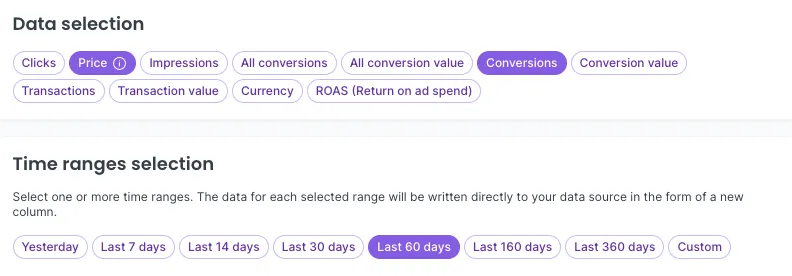
You first need to calculate the metric, as it cannot be directly imported from Google Ads. Instead, you will need to:
Import Cost from Google Ads
Import Conversions from Google Ads
Both for the exact same date range as shown below:
STEP 2 - calculate the CPA
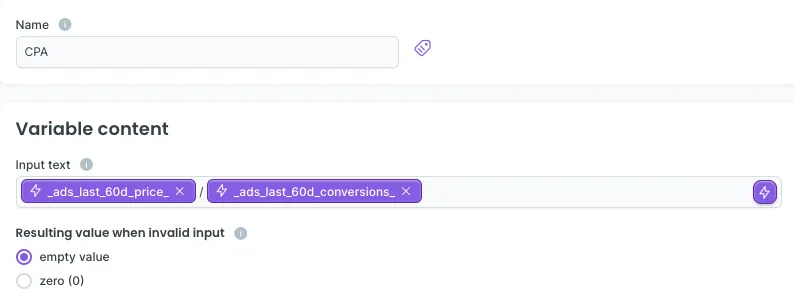
Next, you need to create a new variable that calculates CPA from the additional data.
CPA formula: Advertising Cost / Conversions
With this in mind, create CPA variable:
Navigate to your data source
Go to Variables section and click “+”
Choose Numeric variable
Name it appropriately so you can easily identify it later in your data source. We’ll use “CPA”
In the Input field, replicate the formula above using data from your source
(See the image below for how it should look)
STEP 3 - segment your products
Depending on the CPA ranges and the number of conversions, divide your products into different buckets as described above:
Top products: Low CPA (and optionally combine with High ROAS)
Mid products: Mid CPA (and mid or slightly higher ROAS)
Loser products: High CPA (and low ROAS)
STEP 4 - Build the campaigns
The final step is simple: build campaigns based on your product groups. The primary bidding strategy is tCPA.
Be ambitious and try setting a higher CPA than the average CPA of the products in your groups.
Coming soon:
Product analytics
Now you can track, compare, and optimize product performance across all your campaigns in one place. Try it out!